The agency UTM naming convention SOP for cleaner client reporting
A practical UTM naming workflow agencies can use to standardize campaign links before they reach ads, email, social, and client reports.

Linkly Team
Agencies do not lose reporting trust because one person made one typo.
They lose it because every account manager, freelancer, and channel owner names campaign links a little differently. This SOP gives your team one repeatable UTM naming workflow before links reach ads, email, social posts, or client reports.
When to use this SOP
Use this SOP whenever your agency creates, reviews, or hands off campaign links for a client.
It is especially useful when:
- Multiple teammates create links for the same client
- Campaigns run across paid, email, organic, influencer, or partner channels
- Clients ask why reports do not match the plan
- GA4, ad platforms, or dashboards show messy source and medium values
- Your team still relies on spreadsheets to approve campaign URLs
If you need to build links while following this workflow, start with Linkly's free UTM builder. It keeps the required fields visible before the link is shared.
The workflow
- Assign one campaign name before any links are created.
- Define approved source and medium values for each channel.
- Create the destination URL and confirm it is the final landing page.
- Build the UTM link using the approved values.
- Generate a readable internal link name for the team.
- Review the URL before launch.
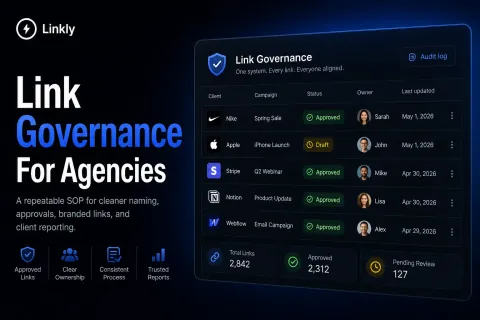
- Store the final link in one shared system.
- Use the same naming pattern when reporting campaign performance.
For step five, use the link naming generator to turn client, campaign, platform, content type, and date context into a consistent slug.
Naming rules
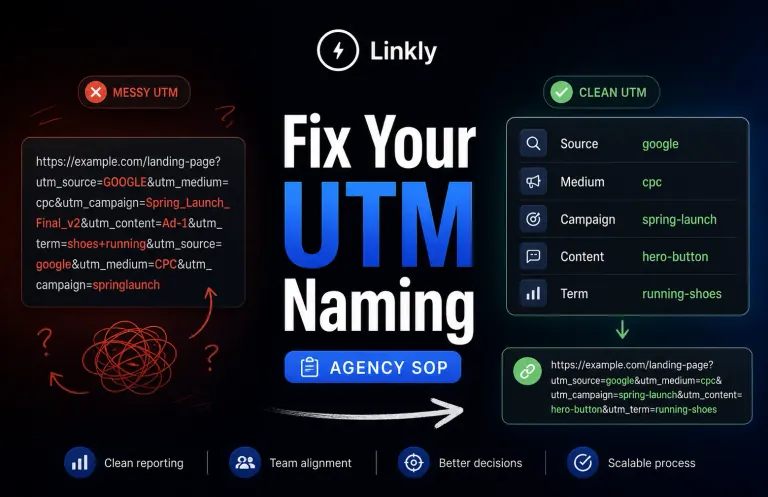
Use lowercase values unless a platform requires otherwise.
Use hyphens or underscores consistently. Do not mix both inside the same client workspace.
Keep source values tied to the platform or referrer:
- newsletter
- partner
Keep medium values tied to the traffic type:
- cpc
- paid-social
- organic-social
- referral
Keep campaign values tied to the initiative, not the asset:
- spring-launch
- q2-webinar
- retainer-renewal
- holiday-promo
Use content values for creative, placement, or variant details:
- hero-button
- footer-cta
- carousel-a
- partner-blast
Do not put owner names, internal jokes, last-minute notes, or client comments into UTM fields. Those belong in your project management system, not your analytics data.
Review checklist
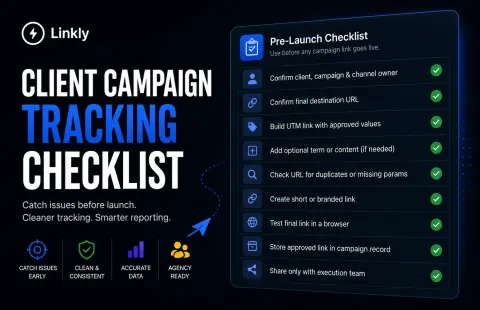
Before a link goes live, confirm:
- The destination URL loads
- The source matches the approved platform value
- The medium matches the approved channel type
- The campaign name matches the client plan
- Optional term and content values are useful, not random
- There are no duplicate UTM parameters
- The link uses the right client or branded domain
- The final link is stored where the whole team can find it
Run questionable URLs through the link cleanliness checker before they reach a client-facing campaign or report.
Common mistakes
The most common mistake is letting each person invent values at the moment they create a link.
That creates reporting splits like:
- paid-social and paidsocial
- newsletter and email
- fb and facebook
- springlaunch and spring-launch
Another common mistake is changing the campaign value mid-flight. If the campaign name changes after launch, reporting gets split across multiple rows and the client sees a mess instead of a story.
The last common mistake is treating link naming as admin work. It is not. It is reporting infrastructure.
How Linkly helps
Linkly is built to make this SOP easier to follow in daily agency work.
Use the UTM builder to create structured campaign URLs, the link naming generator to standardize internal names, and the link cleanliness checker to catch avoidable mistakes before launch.
When the process needs to scale beyond free tools, Linkly helps agencies organize links by client, campaign, domain, and report. See pricing when you are ready to move the workflow into one governed system.
Bottom line
A UTM naming SOP is not about making links look tidy.
It is about protecting client reporting from preventable confusion. If every campaign link follows the same naming rules before launch, your reports become easier to trust, explain, and repeat.